

Home Golf Simulator Setup Done Right

A great home golf simulator setup usually looks simple once it is finished - clean screen, crisp image, reliable ball data, and enough room to swing without thinking about the ceiling. Getting there is the hard part. Most problems start long before installation, when buyers choose equipment before they understand the room, the player, and how the simulator will actually be used.
That is why the best approach is not to start with brands or price tags. Start with the space and the outcome you want. Are you building for serious game improvement, family entertainment, or both? Are you converting a garage, finishing a basement, or planning a dedicated room from scratch? Those answers shape every part of the project, from launch monitor choice to projector placement.
What a home golf simulator setup really needs
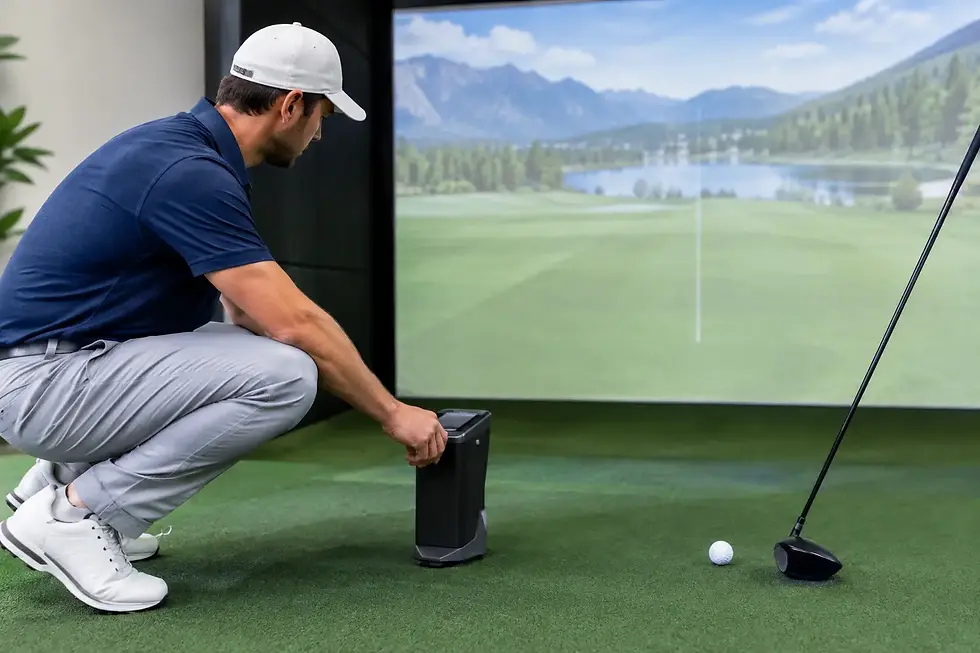
At a minimum, a home golf simulator setup needs five things to work together well: a launch monitor, impact screen, hitting area, enclosure or screen mounting system, and a computer or device capable of running the software. Most builds also include a projector, quality turf, side protection, and room treatments for safety, sound, and appearance.
The mistake many buyers make is treating these as separate purchases. In reality, they behave like one system. A premium launch monitor can feel underwhelming in a bad room. A strong projector cannot fix poor screen placement. Cheap turf can ruin the feel of an otherwise excellent simulator. When the parts are selected together, the result is better performance and fewer compromises.
Start with room dimensions, not equipment
Before comparing Trackman, Uneekor, Foresight, or ProTeeVX, measure the room carefully. Ceiling height is often the first filter. Many golfers can swing comfortably in 9-foot spaces, but that depends on height, club length, and swing shape. For some players, especially with driver, 10 feet or more creates a much better experience.
Room width matters just as much. If both right-handed and left-handed players will use the simulator, you need enough width to support centered hitting or a practical offset design. Depth is also critical because the launch monitor, hitting zone, screen distance, and player clearance all need to fit without crowding the room.
This is where custom planning matters. A garage setup may need to account for door tracks, openers, heating, and concrete floors. A basement may have soffits, beams, or limited projector throw distance. A bonus room may have enough length but not enough height near the hitting zone. Every room has a usable version of the project, but not every room supports every type of system.
Choosing the right launch monitor for your goals
The launch monitor is the engine of the simulator, but the best choice depends on what matters most to you. If your priority is high-end performance analysis and trusted ball tracking, you may lean toward a premium system such as Trackman or Foresight. If you want strong data with overhead convenience and easier righty-lefty play, Uneekor can be a very attractive fit. If value matters and you still want a strong simulator experience, other platforms can make sense in the right room.
The trade-off is usually between budget, data depth, space requirements, and user convenience. Some systems need specific placement behind or beside the golfer. Others are mounted overhead, which creates a cleaner look and a simpler hitting area. Some are ideal for dedicated players chasing precise club data. Others are better suited for mixed-use family spaces where simplicity matters as much as analysis.
A good installer does more than recommend a popular unit. They help you match the monitor to the room, the players, and the way you will use it week after week.
The screen, enclosure, and projector shape the experience
If the launch monitor powers the simulator, the visual system defines how it feels. A well-built enclosure frames the image, protects the room, and gives the space a finished appearance. The impact screen needs to balance image quality, durability, and noise control. If it is too tight, it can bounce the ball back too aggressively. If it is too loose, the image may suffer.
Projector selection is another place where buyers often underinvest or overestimate what they need. Brightness, aspect ratio, resolution, mounting location, and throw distance all matter. A projector that looks fine on paper may not fit the room or may produce shadows if it is placed incorrectly. In lower ceilings or shorter rooms, this becomes even more important.
The cleanest builds are the ones where the projector, screen size, enclosure dimensions, and hitting position are designed together. That is how you get an image that fills the screen properly and still gives the player enough room to swing comfortably.
Turf and flooring are more important than most buyers expect
A home golf simulator setup is not just about technology. It is also about how the room performs physically. The hitting mat has a direct impact on comfort, injury prevention, and realism. If you practice often, a poor mat can become a real problem for wrists and elbows.
Flooring around the hitting zone also affects the finished result. Many homeowners want the simulator to feel like part of the house, not a temporary practice station. That means blending stance turf, walkable flooring, ball containment, and clean transitions between surfaces. In garages and commercial settings, durability and maintenance become even bigger considerations.
This is an area where premium materials pay off over time. Better turf feels better, lasts longer, and makes the space more enjoyable to use.
Budgeting for a home golf simulator setup
There is no single price for a home golf simulator setup because the range is wide. A modest but well-planned build can deliver a very satisfying experience. A fully customized room with premium tracking, projection, enclosure work, flooring, and installation can become a major home upgrade.
The smart way to budget is to separate must-haves from nice-to-haves. If performance is your top priority, invest first in the launch monitor and hitting experience. If the simulator will live in a showcase entertainment room, visual finish and room integration may deserve more budget. If the build is in a garage, climate considerations and durable materials may move up the list.
Cutting corners in the wrong places usually costs more later. Replacing low-end turf, fixing projector issues, or reworking a room that was measured incorrectly is more expensive than planning carefully from the start.
Why custom design beats a boxed solution
Off-the-shelf packages can look convenient, but they are often built around average room assumptions. Real spaces are rarely average. A boxed package may not account for beam locations, garage door clearance, left and right-handed play, computer performance, or projector alignment. It may technically fit while still creating a cramped or awkward experience.
Custom design solves those problems before they become expensive. It also gives you better control over performance, appearance, and long-term value. That is especially important when the simulator is part of a broader basement finish, garage conversion, or commercial buildout.
For buyers who want a professional result, working with a company that understands both golf technology and installation details can remove a lot of risk. Green Pro Golf Simulators approaches projects that way - as complete systems designed around the room, the user, and the intended outcome rather than a stack of parts.
Common mistakes that derail good projects
Most failed setups do not fail because the idea was bad. They fail because one key assumption was wrong. Sometimes it is ceiling height. Sometimes it is trying to force a launch monitor into a room that does not suit it. Sometimes it is underpowered computing hardware, poor lighting control, or a mat that does not hold up.
Another common mistake is planning only for the main golfer. If the room will be used by family, guests, or customers, the setup needs to be intuitive and forgiving. Commercial buyers especially need systems that are durable, easy to maintain, and consistent across heavy use.
The best projects feel effortless because the hard decisions were made early and made correctly.
A better way to plan your setup
If you are considering a simulator for your home, start with a simple checklist: room dimensions, player types, primary use, budget range, and the level of finish you want. From there, the equipment choices become much clearer.
A home golf simulator setup should do more than fit the room. It should make practice easier, make entertainment better, and feel worth the investment every time you turn it on. When the design matches the space and the system matches the goal, that is exactly what happens.
The right setup is not the most expensive one. It is the one that makes you want to hit one more shot before dinner, one more wedge before work, or play one more round when the weather outside says you cannot.


Comments