

Golf Simulators Built for Better Golf at Home

A great round can be decided by a few yards, a more confident swing, or simply getting enough quality reps before the weekend. Golf simulators make that possible without checking the forecast, driving to the range, or settling for limited practice time. But the difference between a simulator people use constantly and one that becomes an expensive room feature comes down to planning the full experience around the space.
For homeowners, that means a realistic place to practice, play, and entertain. For commercial operators, it means a reliable attraction that keeps guests engaged, supports repeat visits, and stands up to heavy use. The right system is never just a launch monitor and a screen. It is a coordinated build designed for the golfer, the room, and the way the space needs to perform.
What Golf Simulators Actually Deliver
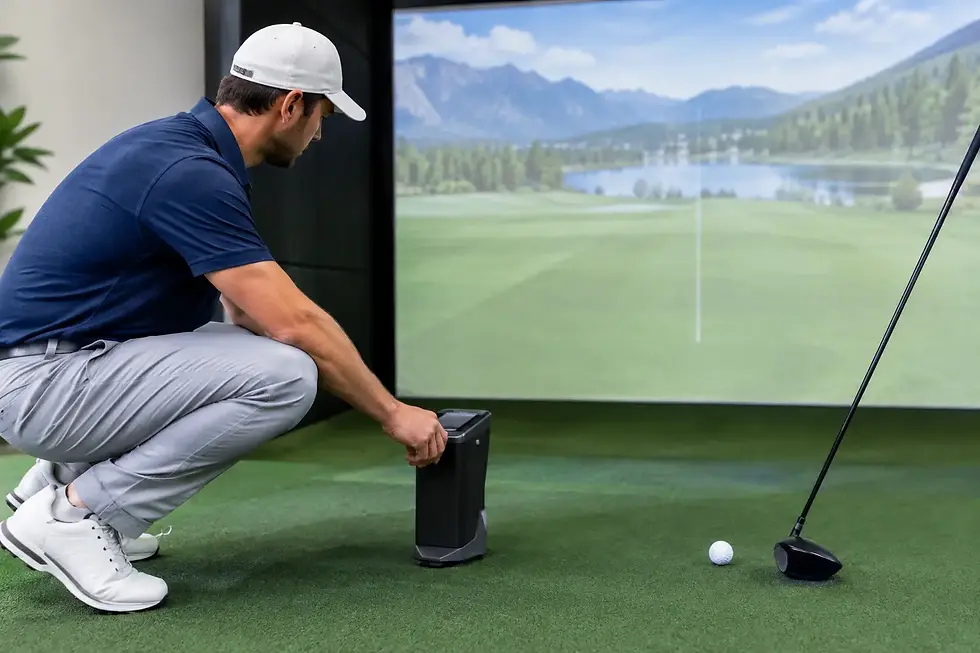
The most obvious benefit is year-round access to golf. A home simulator lets players work on their game before work, after dinner, or during a Minnesota winter without losing valuable time to weather and travel. Ball speed, club data, launch angle, spin, shot shape, and carry distance can turn practice from guesswork into a focused session with measurable feedback.
That feedback matters, but it is only part of the value. High-quality simulator software makes it possible to play famous courses, compete with friends, run closest-to-the-pin contests, or give family members an easy way to enjoy the room. A well-designed setup can serve the serious golfer on Tuesday night and become the center of a Saturday gathering.
For businesses, the value shifts toward experience and utilization. A bar or restaurant can create a reason for guests to stay longer. A golf course can offer lessons, fittings, leagues, and off-season revenue. A school or training facility can provide a controlled environment for instruction. In a 24/7 simulator venue, every bay needs to be accurate, intuitive, durable, and easy for customers to use without constant intervention.
The Room Determines the Right Simulator
The first question is not which launch monitor to buy. It is whether the room supports the kind of golf experience you want.
Ceiling height is often the deciding factor. Most golfers need enough clearance to make a full, comfortable swing with their longest club. While dimensions vary by player and setup, ceilings of 9 feet or higher are generally more accommodating, and 10 feet or more gives many rooms greater flexibility. A tall golfer or an aggressive driver swing may require more room than expected.
Width and depth deserve the same attention. The hitting position must provide safe swing clearance, enough distance to the impact screen, and appropriate placement for the launch monitor. A room that looks large on paper can feel restrictive if the screen, enclosure, seating, and walkways were not considered together. Basements, garages, bonus rooms, and commercial bays all present different constraints, which is why measuring early prevents costly changes later.
The room also affects projection and visibility. Ambient light, ceiling color, wall finishes, and viewing angles influence how immersive the image feels. A bright projector can help in multipurpose rooms, while a dedicated space may benefit from greater light control and theater-style finishes. The goal is not to fill a room with equipment. It is to make the technology feel like it belongs there.
Safety and comfort are part of performance
A premium build protects more than the walls. Proper impact materials, side protection, secure mounting, and a stable hitting surface make the space safer for players and guests. Good turf design also creates a level, comfortable stance and allows the hitting area to function as intended.
Comfort shapes usage, too. If players have to move furniture, adjust cables, or worry about hitting the ceiling, they will use the simulator less often. A clean installation with organized technology, thoughtful lighting, and clear access creates a room people want to spend time in.
Choosing Technology Based on How You Play
There is no universal best launch monitor. The right choice depends on room dimensions, left- and right-handed use, desired data, budget, and whether the simulator is residential or commercial.
Camera-based systems are often a strong fit indoors because they measure the ball and club near the hitting area. They can provide detailed feedback without requiring a large amount of space behind the player. Radar-based technology may be an excellent option in rooms with sufficient depth and can offer strong ball-flight analysis, but it needs to be positioned correctly to perform at its best.
Brands such as Trackman, Uneekor, Foresight, and ProTeeVX offer different strengths across accuracy, club data, overhead mounting, portability, software compatibility, and price. The best decision comes from matching the technology to the application rather than choosing based on a single feature or a headline price.
A dedicated golfer may prioritize detailed club and ball data for structured practice. A family may care most about reliable shot detection, easy course play, and a polished visual experience. A commercial site may need overhead hardware that supports both left- and right-handed players, minimizes bay resets, and keeps traffic moving. Those are different needs, and they should lead to different recommendations.
The screen and projector matter as much as the monitor
A precise launch monitor cannot overcome a dim image or an undersized screen. The impact screen, enclosure, projector, and computer work together to create the visual side of the experience.
Screen size should fit the room and the preferred aspect ratio. A wider image can feel more natural in a commercial bay or entertainment room, while some spaces require a format that makes the most of available height. Projector placement must avoid casting shadows while delivering a bright, crisp image from the tee area.
The gaming computer is another common weak point in poorly planned systems. Modern simulator software demands dependable processing power and graphics performance. A commercial environment may require even more attention to equipment reliability, automatic updates, remote support options, and simple startup procedures. Saving money on the computer can create frustration long after the installation is complete.
Residential Builds Should Fit Real Life
A home simulator does not need to occupy a dedicated wing of the house to be valuable. Many of the best installations are built into garages, basements, and bonus rooms that already have a clear purpose. The key is deciding whether the room is primarily for golf or needs to remain flexible for workouts, movies, storage, or gatherings.
A dedicated golf room can include a full enclosure, permanent projector, custom turf, lounge seating, and integrated audio. A multipurpose garage may call for retractable elements, protective finishes, and a layout that preserves vehicle or storage access. Neither approach is automatically better. The right answer depends on how the household will use the room six months after installation, not just on opening day.
Homeowners should also think beyond the initial purchase. Professional planning accounts for electrical needs, internet connectivity, ceiling mounting, flooring transitions, ventilation, and future upgrades. Those details are less exciting than a new launch monitor, but they are what make the room dependable and finished.
Commercial Golf Simulators Need an Operating Plan
Commercial installations are business assets, not simply oversized home setups. They need to support customer flow, staff training, booking procedures, cleaning, maintenance, and consistent performance from one group to the next.
A restaurant may benefit from bays visible from the dining area, where the golf adds energy without overwhelming service. A golf course may need a teaching-focused studio with camera integration and fitting capabilities. A simulator facility needs each bay to feel equally premium, even when players rotate from one room to another throughout the day.
Revenue planning should be part of the design conversation. Hourly rentals, memberships, leagues, corporate events, lessons, and food-and-beverage packages can all shape the layout and technology choices. More bays are not always the best answer if they compromise player comfort, equipment access, or the overall guest experience.
Reliability is especially valuable in commercial settings. Durable components, professional cable management, secure mounts, and direct access to support reduce downtime when the system is supposed to be earning revenue. A thoughtful installer can also help owners avoid creating bays that look impressive but are difficult for staff and customers to operate.
Why Custom Design Protects the Investment
Online packages can make simulator buying look simple: choose a monitor, add a screen, and start playing. In practice, a package built without regard for the room can create compromises in safety, image quality, accuracy, or usability.
Custom design starts with the space and the goal. It considers who will play, which clubs they will use, whether both right- and left-handed golfers need access, how often the system will run, and what visual finish makes sense for the property. Then it brings the launch monitor, enclosure, projector, computer, turf, and installation details into one plan.
That approach also creates better value. Premium equipment should be selected because it solves a real need, not because it adds an unnecessary feature. Green Pro Golf Simulators helps clients evaluate those choices with golf expertise, technical knowledge, direct vendor relationships, and a hands-on installation process built around the final result.
The best first step is simple: measure the room, think honestly about how it will be used, and share those details before choosing equipment. A simulator designed around your space will feel less like technology you purchased and more like a place you are ready to use every day.


Comments